
· Guide · 8 min read



Welcome to part 2 of our ClickHouse series. Part 1 covered hardware selection. This time, we’re going to explore the ClickHouse settings you can actually tweak once the servers are running to maximize your performance at scale.
ClickHouse has served us extremely well in production across setups of very different sizes: unreplicated single-node virtual machines, large bare-metal clusters ingesting millions of rows per second… you name it.
But, one thing we kept running into was how little practical guidance there was on the internet on operating ClickHouse at the larger end of that spectrum. That’s why in this part we’re focused on filling the gap via a shortlist of performance settings that made the biggest difference for us in terms of performance, availability, and data consistency.
Because sometimes, it’s surprisingly simple. Sometimes, albeit not very often, a correct parameter really ~does~ fix the problem. Let's get into which ClickHouse parameters are worth looking at when operating large data loads.
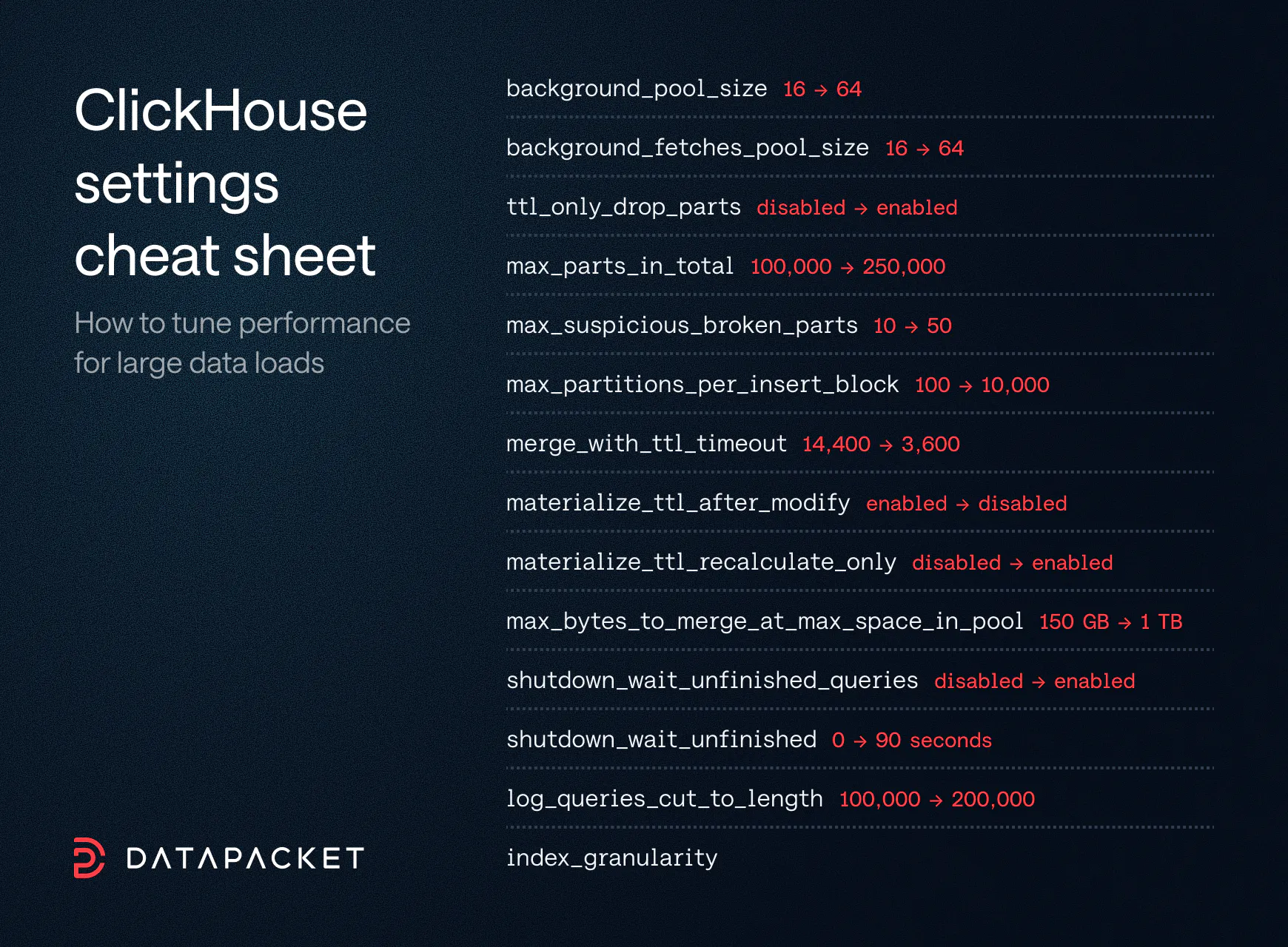
An overview of ClickHouse parameters to boost its performance
background_pool_size (16 → 64)
# Sets the number of threads available for merges and mutations.
background_fetches_pool_size (16 → 64)
# Sets the number of threads available for fetching from other replicas.The default task pool size is easy to exhaust. When that happens, you see metrics such as BackgroundMergesAndMutationsPoolTask max out. It’s followed by knock-on effects, such as accumulating insert queries.
The fix is simple, provided the machine actually has the resources for it. If you’re not already limited by CPU cores, network throughput, or disk I/O (check out part 1 for more hardware info on that), increasing these pools lets ClickHouse use more of the parallelism modern server CPUs are built for.
Don’t be surprised when your metric readings are off by a factor of 2. By default, background_merges_mutations_concurrency_ratio doubles the number of tasks shown by the metrics. A ratio of 2 is, however, a sensible default, given the lightweight nature of tasks over OS threads.
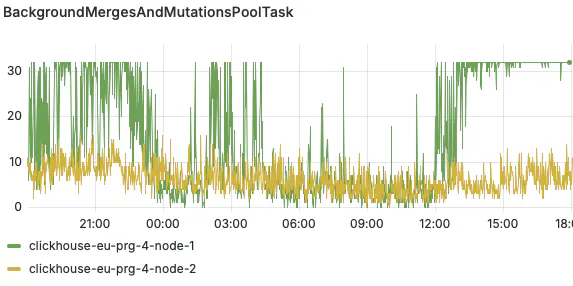
Node 1 suffering from maxed out tasks
ttl_only_drop_parts (disabled → enabled)
# When enabled, ClickHouse only deletes a part once every row in it has expired (according to the TTL expression).
Enabling this setting made sense to us from early on. The TTL expression is almost always a plain timestamp, which means with the only real downside to enabled ttl_only_drop_parts is needing a little extra disk space for ClickHouse to wait until the whole part expires so it can be dropped.
Worst case, that's one partition – usually a tiny fraction of the table's footprint. In exchange, you save a serious amount of CPU.
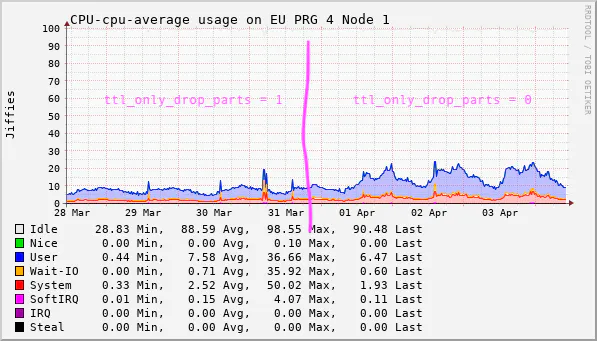
CPU increase after disabling ttl_only_drop_parts
max_parts_in_total (100,000 → 250,000)
# Max number of parts allowed across all tables and databases.
max_suspicious_broken_parts (10 → 50)
# Max number of broken/incomplete parts allowed per table before ClickHouse refuses to load the table during startup.Everybody who has operated ClickHouse long enough eventually meets the infamous “Too many parts” error.
This error occurs when a table partition accumulates too many active parts. The two limits behind it – parts_to_delay_insert and parts_to_throw_insert – are well-documented, so we’ll skip them.
There is a lesser-known setting, however. And that’s max_parts_in_total. Same idea, but applied across all partitions. If you use fine-grained partitioning (for example, as a way to constrain merges), you can hit max_parts_in_total, causing unwanted data loss. Giving yourself headroom on the total makes recovery from the per-partition limits easier.
There’s also max_suspicious_broken_parts. You care about it during an unclean restart – after disk faults, for instance. In those high-pressure moments, getting the instance quickly back up matters more than data consistency. At the time of writing, we are adopting the newer increased default of 100 for max_suspicious_broken_parts. The previous ClickHouse default was 10.
max_partitions_per_insert_block (100 → 10,000)
# Sets the maximum number of partitions a single insert block can touch before ClickHouse rejects the insert.
This setting is really about picking the failure mode you dislike less.
What does that mean in practice? There is a trade-off between consistency and availability. On the one hand, allowing one insert block to create too many partitions can put serious pressure on Keeper. This can slow down the entire instance. On the other hand, if you reject the offending inserts, you’re looking at data loss.
As for us, we use a large max_partitions_per_insert_block. We experienced issues when an old machine came back online after not generating much data. It then tried to insert data spanning multiple months. Although we fixed this specific issue by not allowing inserts of data that was too old, in general, we found it easier to deal with more created parts than failed inserts.
Running ClickHouse at scale? Our Hardware page lists all available server options, so you can easily find the configuration that makes the most sense for your workload.
merge_with_ttl_timeout (14,400 → 3,600)
# Controls how often TTL delete merges can be scheduled in a partition.
This one is more of a refinement of how TTL works. For a handful of our large tables, timely expiry is what keeps disk usage under control. In those cases, we lower merge_with_ttl_timeout to one hour. This costs some additional CPU time. For our tables with TTLs of just a few days that we partition by hour, the trade-off is worth it.
It also pairs particularly well with ttl_only_drop_parts – rows are deleted quickly, before a lot of disk space is used, and CPU is conserved by dropping whole parts.
materialize_ttl_after_modify (enabled → disabled)
# Controls whether ClickHouse immediately rewrites all existing parts to apply a new TTL expression once an ALTER statement has been issued.
materialize_ttl_recalculate_only (disabled → enabled)
# When enabled, MATERIALIZE TTL only recalculates TTL metadata for existing parts, without rewriting or deleting data. With materialize_ttl_after_modify disabled, a TTL change does not immediately rewrite all existing parts. Instead, only new parts use the updated TTL until you explicitly run ALTER TABLE ... MATERIALIZE TTL.
We prefer this behavior. TTL changes can put a lot of load on the cluster, and we'd rather decide when that happens than have it decided for us. All we have to do is then issue one extra ALTER.
Enabling materialize_ttl_recalculate_only on top makes sense if you’re already relying on ttl_only_drop_parts. In a way, the recalculate setting can be thought of as the on-demand equivalent of the drop-parts setting.
max_bytes_to_merge_at_max_space_in_pool (150 GB → 1 TB)
# Max size of a part created during merges.
As your data volume and merging capacity grow, so does the maximum part size produced by a merge. This is especially true on large tables with coarse partitioning.
We've also used this setting in reverse, as a per-table override to constrain merges. The cold tier of our tiered storage is a good example: disk space is plentiful, but I/O is something we'd rather spend elsewhere.
shutdown_wait_unfinished_queries (disabled → enabled)
# When enabled, ClickHouse waits for currently running queries to finish during shutdown.
shutdown_wait_unfinished (0 → 90 seconds)
# Max time ClickHouse waits for unfinished queries during shutdown before terminating them. Graceful shutdown behavior becomes much more important once you’re flushing large batches. This applies whether you do it through asynchronous inserts or the Buffer engine.
We learned this later than we would have liked. Enabling shutdown waiting and giving ClickHouse a real grace period made a meaningful difference for us in terms of minimizing data loss during a rolling restart. File this one under things we learned the hard way so you don’t have to.
log_queries_cut_to_length (100,000 → 200,000)
# Max query text length, in bytes, stored in system.query_log.
You usually discover this setting the day a long query fails, causes a problem, and can't be reproduced. (The story usually goes like this: You inspect it. The query log has truncated the part you needed. "Great. Very helpful. Thank you, log.").
Not a showstopper. Worth bumping anyway.
index_granularity
# Max number of rows for one index entry.
We’re yet to find a good use case for increasing granularity by lowering the index_granularity value. That’s because so many of our queries are large scanning queries.
There are cases, however, where it can make sense. For example, queries that need to locate a small number of rows more precisely and want a faster response time at the cost of more memory.
As a rough rule, halving index_granularity roughly doubles the size of the uncompressed index in RAM.
So our practical advice is: know it exists and understand what it costs. It’s a basic performance setting to be mindful of.
ClickHouse does its best on dedicated servers you don't have to share and with a premium team that holds the line on quality. Tell us what your workload needs, and we'll make sure you receive the best service there is.
Or saves you one of those sleepless nights running large workloads, it has done its job. That's it. In the next part, we’ll look at another layer of running ClickHouse at scale.
See you there.
Founded in 2014, DataPacket is a dedicated server provider operating a global low-latency network. With a footprint of 67 locations across 6 continents, DataPacket helps businesses–including gaming and video streaming companies–to deliver great online experiences.