· Guide · 8 min read


Welcome to part 1 of our ClickHouse series, where we break down the most important principles for running ClickHouse on dedicated servers, both for new and existing setups.
First and foremost, ClickHouse is remarkably efficient with resources, and it’s full of ingenious optimizations. A lot of “performance problems” don’t require new hardware at all. They disappear once you review your data batching, schema design, and query patterns... but that's a topic for another day.
This part of the series focuses purely on hardware selection for your dedicated bare metal ClickHouse setup. Treat the recommendations below as a baseline to start from, not a substitute for workload testing. For more tailored guidance, feel free to reach out to our experienced sales team anytime.
We’ve been using ClickHouse in production for over 5 years as a cornerstone of our data processing pipelines. It helped us scale from processing a few million rows per second to tens of millions without turning our infrastructure into a science experiment.
If you want a bit more background on ClickHouse itself, PostHog’s in-depth article covers it pretty well. For this article, we’re focusing on the part people actually came for: picking the right hardware for a dedicated bare-metal ClickHouse deployment.
So, where do we start?
Before looking at server specs, clarify what you’re actually asking the system to do. Key questions to answer:
Cloudflare’s blog post is a good real-world example of a ClickHouse workload.
Even though it’s rarely this straightforward in practice, these questions are a reliable starting point for hardware sizing. What about actual hardware principles to keep in mind?
A common mistake when setting up ClickHouse clusters is sharding too early. Let’s clarify two distinct terms:
A good rule is to scale up first (bigger nodes; more RAM, faster disks, etc.), and scale out only when a single node can no longer hold the shard or meet throughput requirements. In most cases, this approach means better value for money and less operational complexity. The ClickHouse engine is built to fully utilize all the available resources on the machine; hence, fewer strong nodes usually beat many small ones.
With a large cluster of low-grade machines, it’s easy to end up with:
The main reason is that even though ClickHouse distributes queries across all shards and even multiple replicas, the partial results need to be joined on the node that received the original query.
As mentioned, we recommend starting with 1 shard with 2 replicas, or 3 if the data is really critical. Don’t introduce another shard until you can no longer get a more powerful machine.
One key thing to note is that using replication requires a separate coordination cluster using either ZooKeeper or Keeper. That topic is out of scope for this blog post, but keep in mind that while these instances are not computationally intensive, ClickHouse will fall into read-only mode without them.
More cores mean more power to process tasks in parallel. ClickHouse is designed to take full advantage of this, parallelizing query execution across all available cores, which the ClickHouse team demonstrated in their blog post. While it focuses on Intel Xeon processors, the same principles apply to AMD EPYC-based hardware. In our own testing on the EPYC 9754, ClickHouse can utilize all 128 cores under load.
Aiming for the highest core number rather than the highest CPU frequency also means disk accesses will benefit greatly under the concurrent load of multiple tables writing new data, merging existing ones, and executing user queries. CPU frequency has a less dramatic effect. It impacts the normal operating range of CPU usage and the latency of ad-hoc queries. Overall throughput in ClickHouse usually scales more with the number of CPU cores.
What about CPU utilization targets? The official ClickHouse documentation notes that there is no universal CPU utilization target, but recommends 10–20% for analytical and data warehousing workloads with ad-hoc queries. In our experience, many production workloads perform well at 30-40% sustained usage. Even 50–60% is perfectly fine for workloads that are less latency-sensitive or for which only moderate growth is anticipated. Just make sure you leave enough headroom for traffic spikes and background merge operations.
ClickHouse benefits massively from RAM. Beyond the working memory it uses directly for query execution and background tasks, the rest isn’t wasted. It’s used as an OS page cache to keep hot data in memory and speed up subsequent queries.
The official documentation lists 32 GB of RAM as a sensible production minimum for a server, although ClickHouse can run on much less with additional tuning. (Yes, you can easily run ClickHouse on your laptop.)
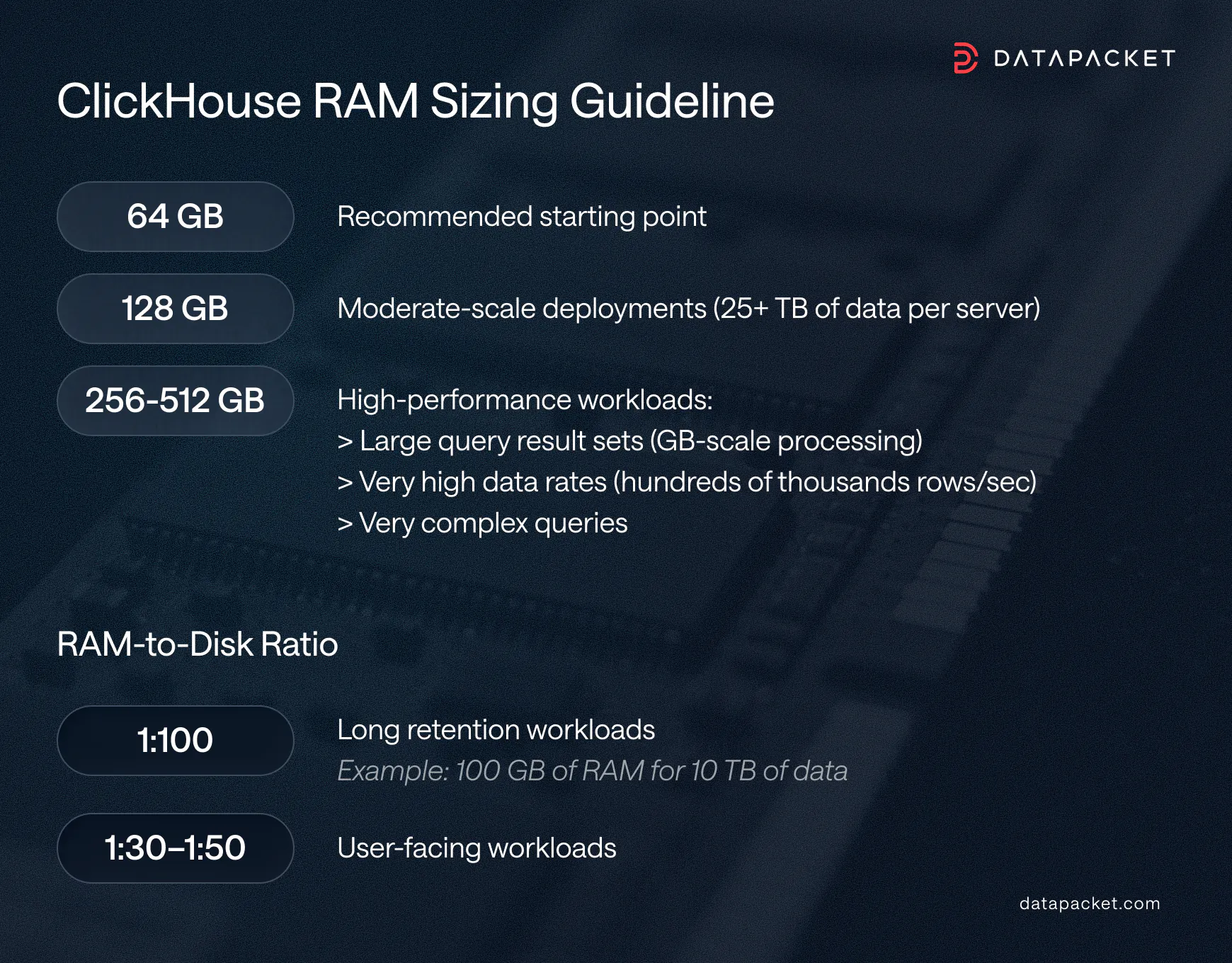
Based on our experience, here's a simple rule of thumb to get you started:
Another important factor is the RAM-to-Disk ratio. For workloads with long retention times, the recommended ratio is 1:100. For example, 10 TB of data would require at least 100 GB of RAM. For more user-facing workloads, a ratio of 1:30 to 1:50 is generally recommended.
If in doubt, go with more RAM. Unlike most other hardware changes, adding RAM to a bare metal server is one of the easiest upgrades. It typically requires only a brief maintenance window for a reboot, with no data migrations or configuration changes needed. Our skilled support is available 24/7.
For most analytical workloads, SSDs are the default choice, preferably fast NVMe drives.
HDDs can work, but they require careful load management, mainly due to their limited IOPS capacity. This often forces you to use a large number of disks, which can negate some of the cost savings.
For tiered storage setups (hot SSD + cold HDD), which ClickHouse natively supports, we recommend caution. While this type of setup can bring some cost savings, we've had operational difficulties managing it.
Although open source ClickHouse supports S3 compatible object storage as a storage backend, it comes with several caveats, including slower merge performance, higher query latency, and the fact that each replica maintains its own full copy of the data in S3, effectively multiplying the required storage by the number of replicas. For these reasons, we only recommend using object storage for cold, infrequently accessed historical data rather than active workloads.
But since every deployment is different, we’ve prepared a set of example starting configurations to serve as inspiration and a practical framework you can adapt to your workload.
The configurations below are reasonable starting points for self-hosted ClickHouse sizing. Adjust based on your concurrency, retention, and query complexity.
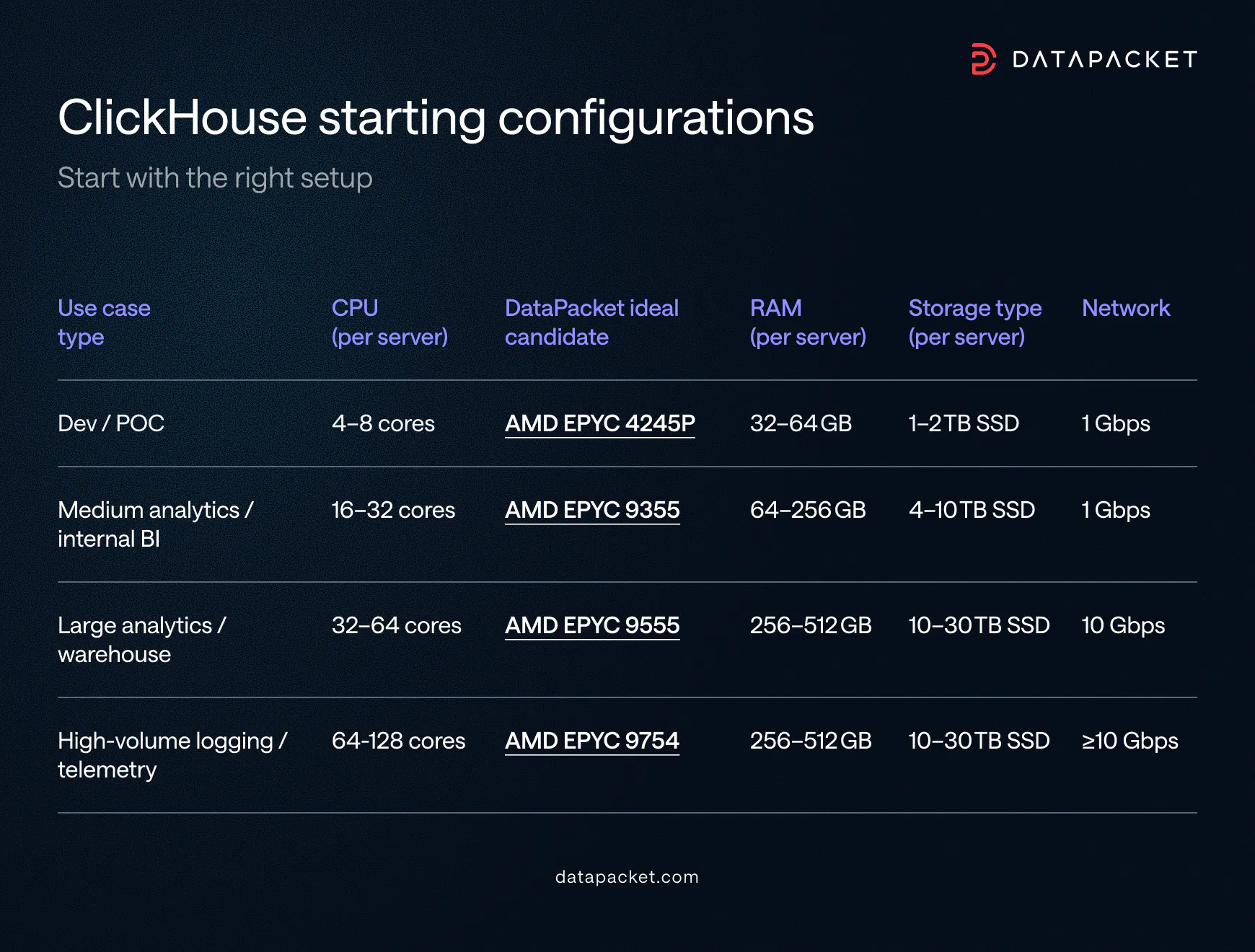
Our Hardware page lists all available options, so you can easily find the configuration that makes the most sense for your workload.
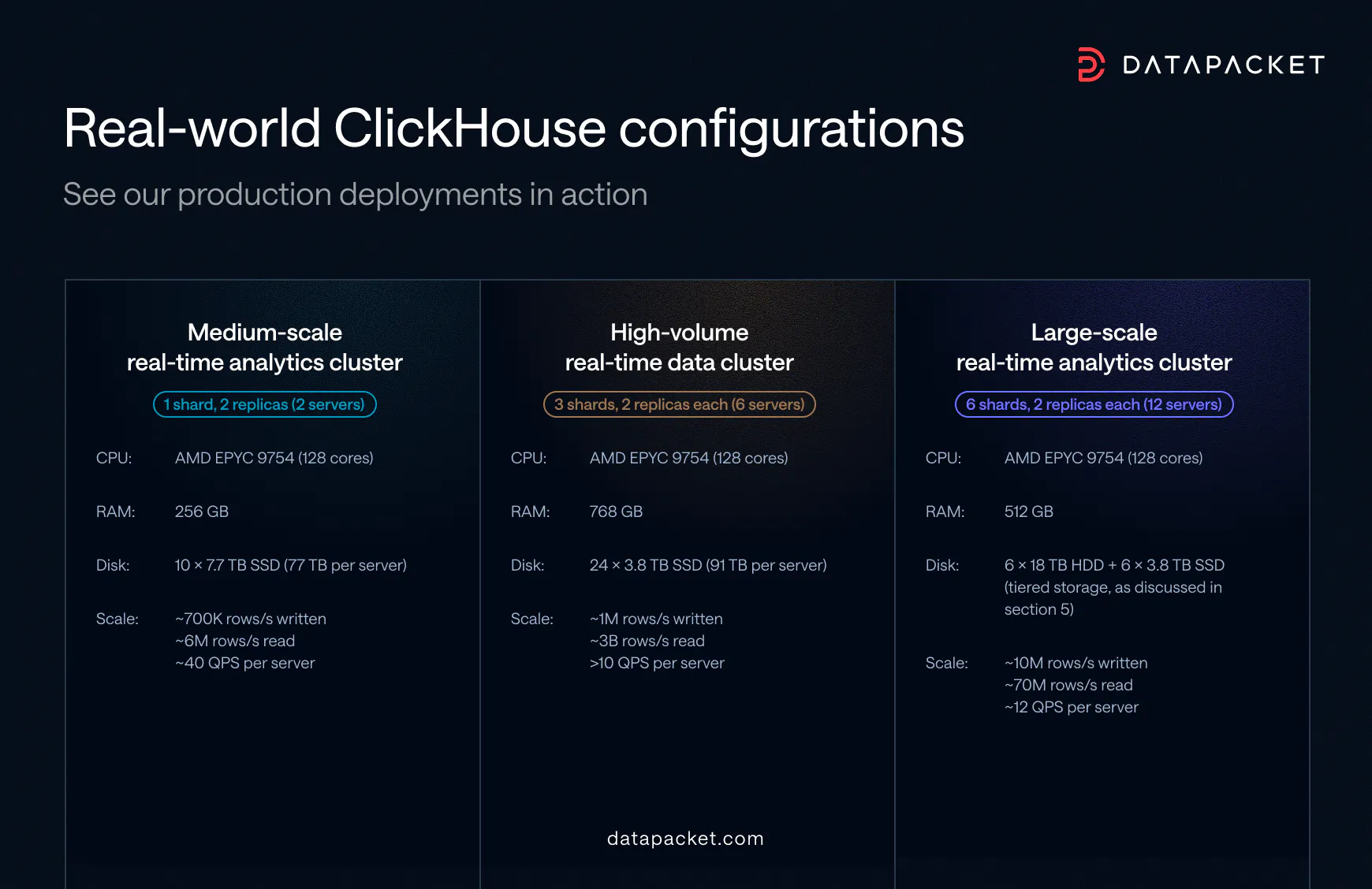
To show how the principles above translate into practice, here are three of our production ClickHouse clusters that each serve a different scale and workload profile. The examples are not meant to be copied directly.
All figures are approximate. Write throughput refers to total rows inserted across all tables, including rows generated by materialized views. Read throughput and QPS (Queries Per Second) are measured across all replicas.
Choosing the right hardware is only the first step toward a well-performing ClickHouse deployment. If you’re planning your own setup, we combine top-tier dedicated infrastructure and a high-performance global network with our relentless client focus to help you get the most out of it.
You can build your server directly on the Server configuration page.
If your workload has more specific requirements, our team is always happy to help design a setup that fits your needs. Let us know!
In the next part of the series, we’ll move from hardware to actual deployment and walk through practical best practices for bringing a new ClickHouse cluster online so that it stays fast, stable, and is easy to operate from day one.
Founded in 2014, DataPacket is a dedicated server provider operating a global low-latency network. With a footprint of 67 locations across 6 continents, DataPacket helps businesses–including gaming and video streaming companies–to deliver great online experiences.